
Model Releases
Introducing Karya Studio Desktop: A Free Windows App for Your Karya Account
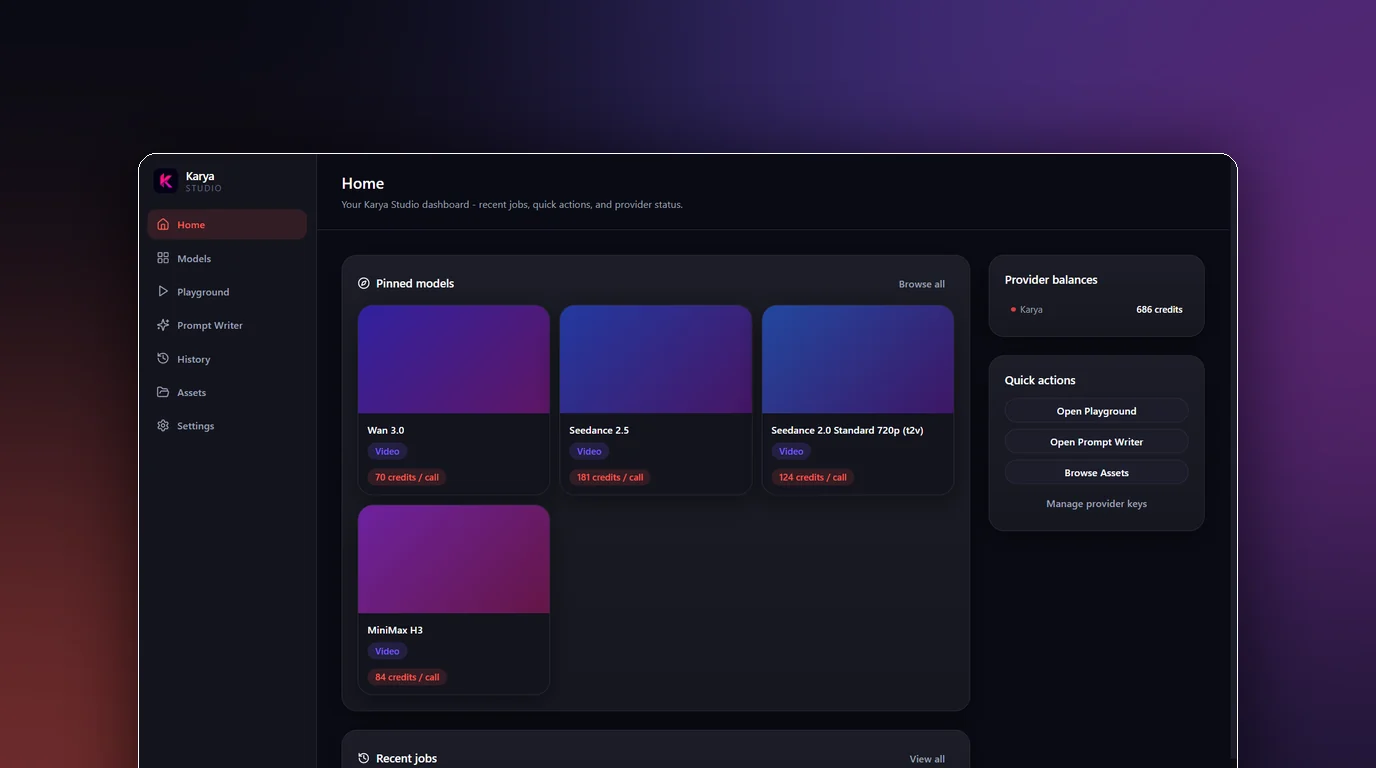
Karya Studio has lived entirely in the browser until now. Karya Studio Desktop changes that: it is a free Windows app that gives your Karya account a native window, its own History and Assets screens, and generations that download straight to a folder on your PC as soon as they finish - without asking you to open a new tab every time you want to generate something.
One API key, your existing credit balance
Setup is a single step: open the app and paste one Karya Studio API key, generated from karyastudio.io/settings#api-keys. From there, everything you run in the app is billed from your existing Karya credit balance - there is no separate desktop account to create and no separate plan to buy. It is the same pay-as-you-go credits, in a different window.
All 65 models, four pinned to Home
Every model available in Karya - 65 image and video models in total - is usable from the desktop app's Models and Playground screens, each with its own tabbed parameter form. Four are pinned to the Home screen as quick-start shortcuts, not as a limit on what you can run:
- Seedance 2.5 - up to 1080p, 4 to 30 seconds, the widest aspect-ratio range of the four including 21:9.
- Seedance 2.0 - the only one of the four that reaches 4K, at 4 to 15 seconds.
- Wan 3.0 - up to 1080p with the most flexible duration range, 2 to 30 seconds.
- MiniMax H3 - up to 2K, 4 to 15 seconds.
Local-first: every generation lands on your PC
Every finished generation downloads automatically to a folder on your computer, no manual save step required. Alongside each file, the app writes a sidecar .json recording the model used, the prompt, the settings and the credit cost - so a folder of generations stays self-documenting even months later, without digging back through the app's History tab to remember how something was made.
Five screens: Home, Models, Playground, History, Assets, Settings
The app is organized around a small set of screens: Home for the pinned model shortcuts, Models for browsing the full catalog, Playground for the tabbed per-model parameter forms, History for every job you have run with its credit cost, Assets for a gallery of what you have generated, and Settings for your API key and app preferences.
Jobs survive a restart, failures are refunded
Close the app in the middle of a render and reopen it later - the job resumes on its own and completes, rather than being lost. And if a generation fails outright, it is refunded automatically: the job is marked refunded in History and the credits return to your balance with no action needed from you.
Your API key stays on your machine
The API key you paste in is encrypted at rest using Windows' own DPAPI (via Electron's safeStorage), and it never leaves your machine except to talk to Karya's servers when you generate. There is no separate copy of it stored anywhere else by the app.
Getting started in three steps
- 1. Download the installer (or the no-install portable .exe) from the GitHub release below.
- 2. Open it - if Windows SmartScreen shows "Windows protected your PC," click "More info," then "Run anyway." That warning appears because the app is not yet code-signed with a paid certificate, not because of anything wrong with the download; the file comes from Karya's official GitHub release.
- 3. Paste your API key from karyastudio.io/settings#api-keys and start generating from your existing credit balance.
What is honestly not there yet
- Windows only - there is no Mac or Linux build today.
- No auto-update yet - a new version means downloading and installing the release again.
- Generation speed depends on an upstream queue outside the app's control, and it has varied recently - the app does not promise a fixed turnaround.
- The built-in Prompt Writer currently needs your own LLM API key connected in Settings to work.
Download it
Karya Studio Desktop is live now. Read more and find the download links at karyastudio.io/desktop, or go straight to the installer: https://github.com/nextgentrainingacademy88-max/karya-studio-desktop/releases/download/v0.2.2/KaryaStudio-Setup-0.2.2.exe. Windows 10/11, 64-bit, about 84 MB - or grab the portable .exe from the same release if you would rather skip installing anything.
Try it in Karya
Generate images and videos with frontier AI models from one canvas. Subscribe from $19/mo, or top up from $5 - 200 bonus credits with your first purchase, and top-up credits never expire.
Start free