
Model Releases
Introducing Karya Flow: Build Multi-Step AI Pipelines on a Canvas
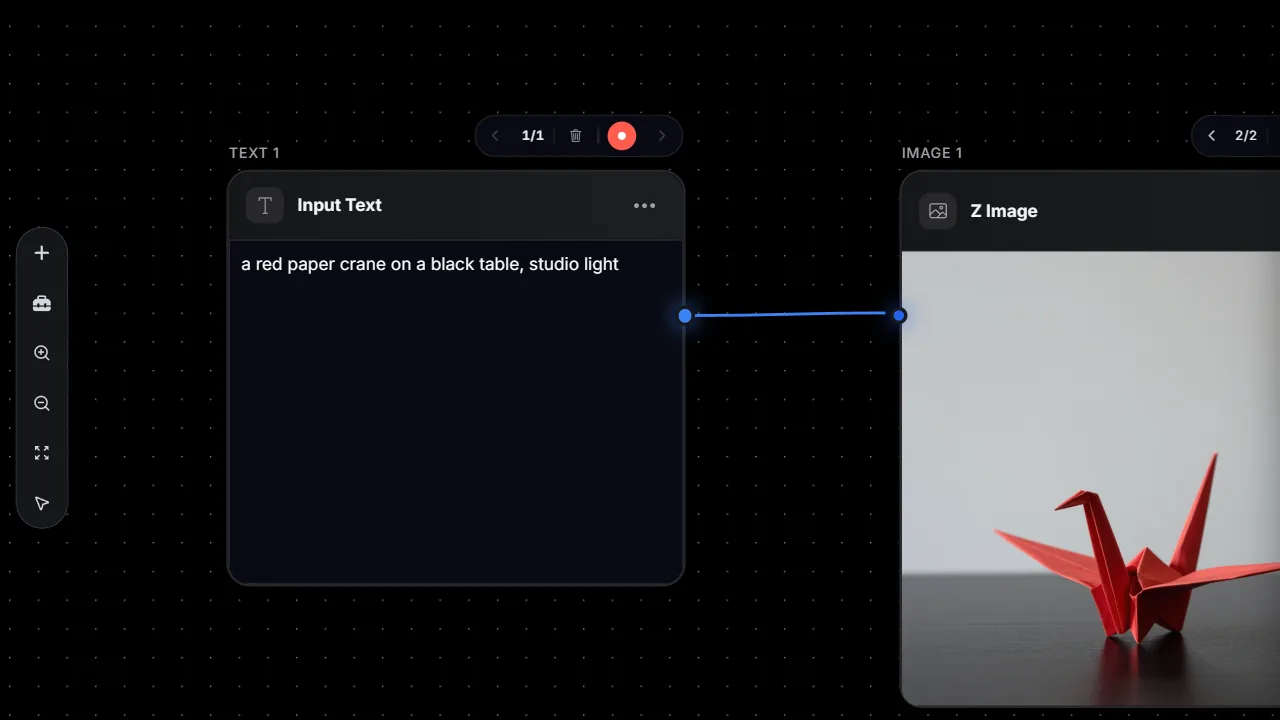
Most AI generation still happens one step at a time: write a prompt, generate an image, download it, upload it somewhere else, generate a video, download that. Karya Flow collapses that into one canvas. You wire prompt, image, video, voice and utility nodes together into a single graph, and press one button to run the whole thing end to end.
A simple example: a text node writes out a concept, its output feeds an image node that turns the concept into a still, and that still feeds a video node that animates it into a finished clip. Type the idea once, and Flow carries it through every step until a video comes out the other end.
The building blocks: node types
Flow is built from a small set of node types that cover most of a real production pipeline, not just image generation:
- Prompt / text nodes - write or generate the text that feeds downstream steps.
- Image nodes - text-to-image and image editing.
- Video nodes - text-to-video and image-to-video, including animating a still from an earlier node.
- Voice and sound nodes - text-to-speech and sound-effect generation.
- Upscaling nodes - sharpen and enlarge an image or frame.
- Background removal nodes - cut a subject out cleanly for compositing.
- LLM text-generation nodes - draft or rewrite copy using Gemini Flash or GPT-5.2 before it hits an image or video node.
Headline models available in Flow nodes
Because Flow sits on top of the same Karya catalog as the rest of the studio, its image and video nodes can call the same frontier models: Nano Banana 2, GPT Image 2, Flux 2 Pro, Seedream 5 Lite, Qwen Image, Z-Image and Grok Imagine for images; Seedance 2.0 (Standard, Fast and Mini), Gemini Omni, Kling 3.0, Wan 2.7 and Hailuo 2.3 for video; ElevenLabs for voice and sound effects; and Topaz for upscaling. You pick the model per node, the same way you would in the Image or Video Studio.
Flow Architect: describe it, get the graph
Building a graph node by node is optional. Flow has a built-in chat called Flow Architect - describe the workflow you want in plain words ("write a product tagline, turn it into a poster, then animate the poster into a short video") and it drafts the node graph for you, wired and ready to run or edit.
Run one node, or run the whole pipeline
You are not locked into running everything at once. Any single node can be run on its own to test or regenerate just that step, or you can run the full graph in one click and let each node's output feed the next automatically. Workflows can be saved for later, started from ready-made templates ("Image Generator", "Image to Video"), and published as templates for others to build on.
Pricing: pay only for what runs
Flow uses the same pay-as-you-go credits as the rest of Karya - there is no separate subscription for it. Each node shows and charges its own credit cost, so running a pipeline costs the sum of its steps, and you can see that cost before you run. If a step in the pipeline fails, its credits are automatically refunded rather than lost. Top up in Malaysian Ringgit (MYR) whenever you need to, and unused credits never expire.
Also launching: Karya MCP
Alongside Flow, Karya is also launching Karya MCP - a way to connect Claude, Cursor, or any MCP-compatible client directly to Karya. Create an API key at karyastudio.io/mcp, wire it into your client of choice, and you can generate images and video from inside your everyday chat or editor, billed against the same Karya credit balance.
It is a companion to Flow rather than a replacement: Flow is the visual canvas for building a repeatable, multi-step pipeline; Karya MCP is for generating on the fly from wherever you already work.
Try Karya Flow
Karya Flow is live now in Karya Studio under the Flow tab. Sign in and open the Flow tab to try a starter template, or describe what you want to Flow Architect and let it build the graph for you.
Try it in Karya
Generate images and videos with frontier AI models from one canvas. Subscribe from $19/mo, or top up from $5 - 200 bonus credits with your first purchase, and top-up credits never expire.
Start free